
Explore database relationships
See the whole database, then focus on the relationships that matter.
Connect to PostgreSQL and choose Navigate → Schema Diagram…, press Option–Command–D, or use the diagram toolbar button. The diagram opens in its own native window, with resizing and full-screen support.
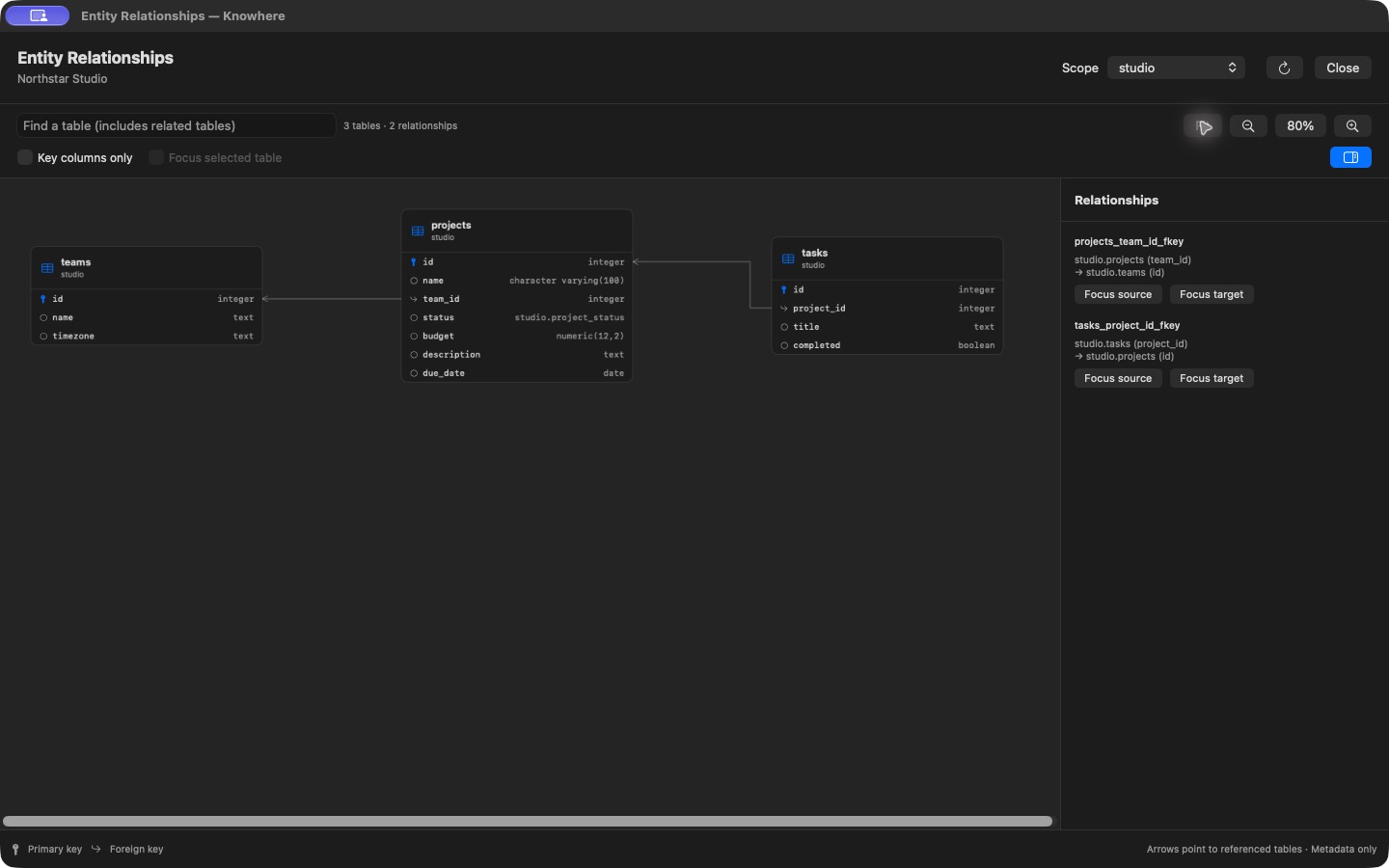
Choose a scope
Entire Database includes user schemas across the connected database, excluding system schemas. Choose a particular schema when you want a smaller view. Cross-schema references can retain their target tables so the relationship remains understandable.
The diagram uses declared PostgreSQL foreign keys. It does not infer relationships simply because two column names look similar.
Navigate a large schema
- Search for a table to narrow the diagram and retain related tables.
- Select a table and enable Focus selected table for its immediate neighborhood.
- Leave Key columns only enabled for a compact overview; turn it off to see all columns.
- Use Fit, zoom controls, trackpad magnification, and horizontal/vertical scrolling.
- Show the Relationships panel for names and exact source/target mappings, especially composite keys.
Large graphs can still contain crossings. If a routing or metadata budget is reached, follow the visible guidance and narrow the scope. The diagram is a metadata viewer: moving through it does not modify the schema or generate migrations.