
Connect to PostgreSQL
Start with a local database, Docker-published port, or a remote server.
Add a connection
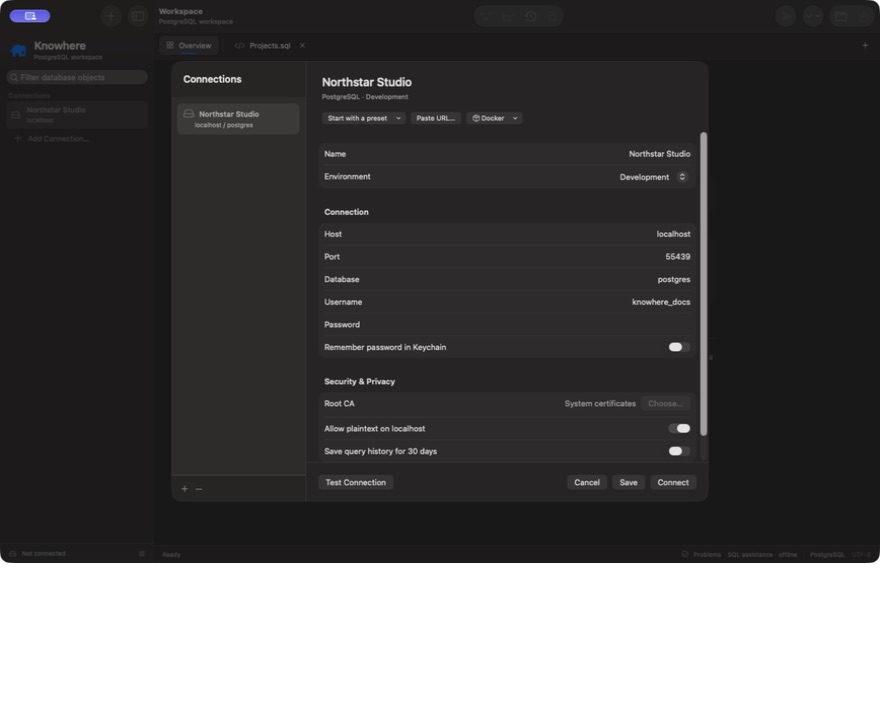
Choose Add Connection… in the sidebar or Connection → Manage Connections…. Enter a name, environment, host, port, database, and username. Enter the password for this session, or choose Remember password in Keychain to save it securely on this Mac.
Choose Test Connection to verify access, then Connect. Expand a schema in the sidebar and double-click a table to open its Data and Structure tabs.
Local PostgreSQL and Docker
The usual PostgreSQL port is 5432. With Docker, enter the published host port, which may be different from the container's internal port. For a mapping such as 5433:5432, connect to localhost:5433.
If your local server does not support TLS, enable Allow plaintext on localhost. This exception is limited to localhost, 127.0.0.1, and ::1. Remote connections use verified TLS by default. For a server that cannot provide TLS, choose Use Plaintext… in Security & Privacy and review the warning. Confirming sends credentials, SQL and results without encryption or server identity verification; use this only for public demonstration data or a trusted network. Consent is saved for that connection and host. Changing the host clears it; Use Verified TLS restores protection. Imported URLs cannot enable remote plaintext automatically. Store builds use manual Docker host/port entry; they do not run Docker's external command-line tool.
Remote databases and certificates
Use the hostname supplied by your database provider. TLS verifies both the certificate chain and hostname. If your server uses a private CA, select its PEM root CA certificate bundle with Choose…. Knowhere imports a local copy; reselect the file when your CA changes. Bundles must be at most 1 MB and must not contain private keys.
A certificate issued for a DNS hostname may not validate when connecting by IP address. Use the hostname on the certificate rather than disabling verification.
Environments and write protection
Label connections Development, Staging, or Production to keep context visible. Connections start with writes locked in Knowhere. Unlock only when you intend to change data, and use PostgreSQL roles with the minimum permissions needed.
Importing a PostgreSQL URL can populate connection details. Treat URLs containing passwords as secrets; do not include them in screenshots, issue reports, or saved SQL files.